---
title: Analytics Pages
description: A general overview on the Analytics Pages.
---
[Skip to content](https://help.sertifier.com/analytics-pages-overview#main-content)
[Create Support Ticket](https://help.sertifier.com/kb-tickets/new?hsLang=en)
[](https://help.sertifier.com/?hsLang=en)
- [Create Support Ticket](https://help.sertifier.com/migration/kb-tickets/new)
- [FAQ](https://help.sertifier.com/faq)
Open main navigation
Close main navigation
- [Create Support Ticket](https://help.sertifier.com/migration/kb-tickets/new)
- [FAQ](https://help.sertifier.com/faq)
- [Create Support Ticket](https://help.sertifier.com/kb-tickets/new)
- [Login](https://app.sertifier.com/en/login)
[Login](https://app.sertifier.com/en/login)
How can we help you?
- There are no suggestions because the search field is empty.
1. [Help Center](https://help.sertifier.com/?hsLang=en)
2. [Account Management](https://help.sertifier.com/account-management?hsLang=en)
3. [Analytics](https://help.sertifier.com/account-management?hsLang=en#analytics)
# Analytics Pages
## A general overview on the Analytics Pages.
### **Summary Page**
The **Summary** page gives you overall insights about all of your sent credentials.
Here, you can see;
- Total number of created **credentials.**
- Total number of **recipients.**
- Your **delivery success rate.**
- Your **rates for email opens, shares, and downloads.**
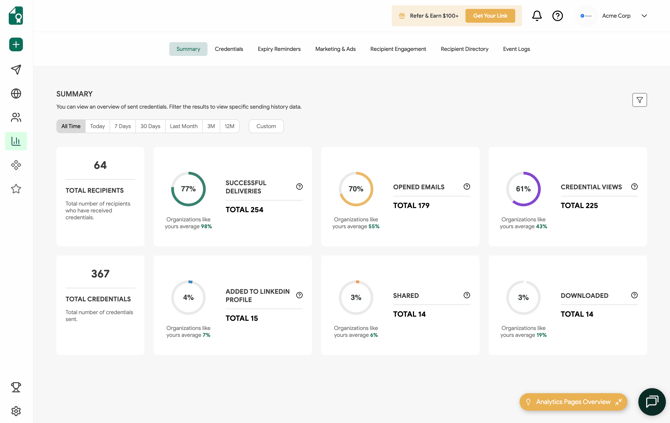
You also have the option to **apply advanced filters**, allowing you to sort the report based on **system and custom attribute values.**

### Credential Reports
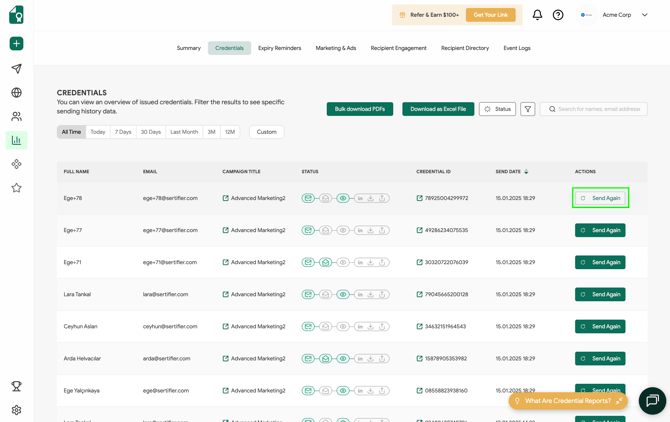
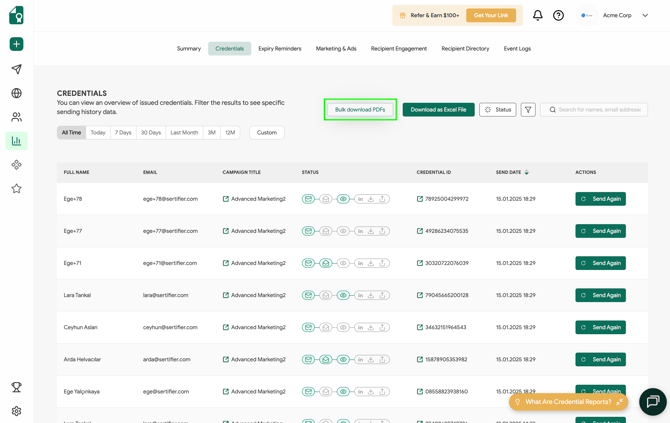
On the Credentials page, you can access a comprehensive list of all the credentials issued from your account, along with detailed information, including:
- Recipient Information
- Campaign Title
- Credential Status
- Credential ID and Credential Page URL
- Send Date
You can utilize the **"Send Again"** button to resend the credential email to the recipient if required or upon their request.
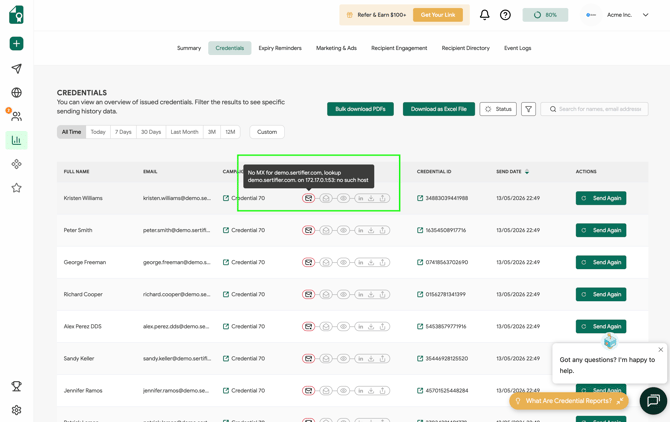
If a credential fails to deliver, you can view the specific failure reason directly within the **Credentials** report under **Analytics**. The system logs detailed error reasons for all undelivered credentials, allowing you to quickly troubleshoot bounce issues or incorrect email addresses.
Please note that these delivery failure logs are retained and visible for the last **30 days** from the date of issuance.
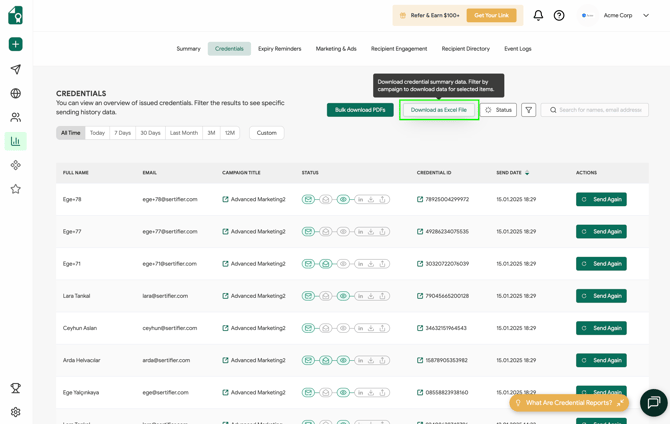
You can easily obtain a copy of the report on your device by clicking the **"Download as Excel File"** button.
With the [**Status filter**](https://help.sertifier.com/analytics-status-update?hsLang=en), you can filter the report by credential status.
This feature allows you to identify undelivered and delivered credentials and track which recipients have engaged with their credentials.

By using **advanced filters** in your report, you can sort credentials based on both system attributes and custom attribute values.
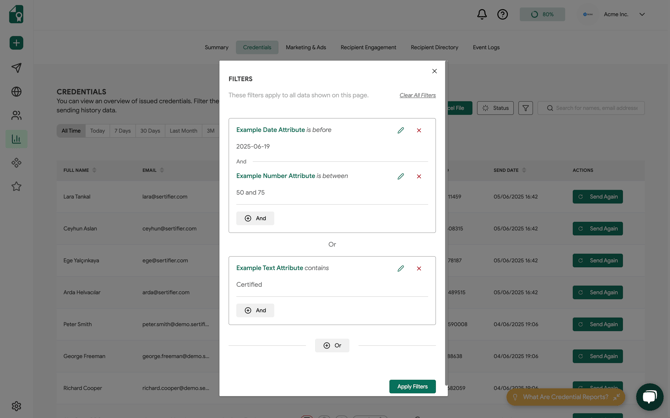
In order to bulk download the certificates you have sent, click on the **Bulk download PDF's** button located in the upper right corner. After applying the filters and clicking the button, the credentials will be sent to your email address.
Related Article: [What are Credential Reports?](https://help.sertifier.com/what-are-credential-reports?hsLang=en)
### **Marketing & Ads Reports**
*Marketing & Ads Reports* allows you to see the general overview of your marketing insights. *Ads* section gives you data on how many times are your credentials shared, what is the total cost that you would pay for such an outreach with paid ads. In this section, you can analyze how your ads perform.
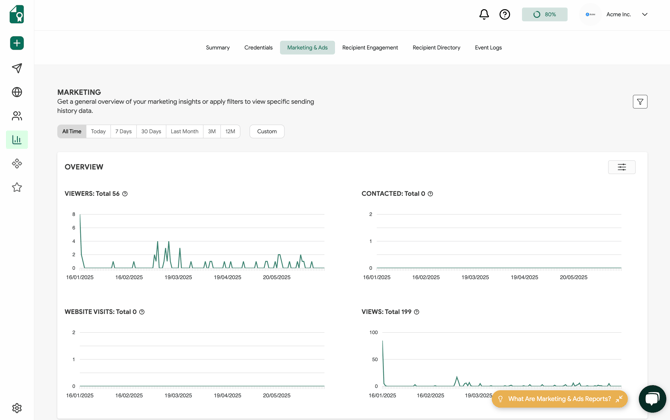
The credentials sent via Sertifier are easily shareable online. These credentials carry your brand image on them, so them being shared by people will cause a good organic marketing and recognition of your brand. *Ads* will help you figure out an organic marketing effect and how valuable is that.
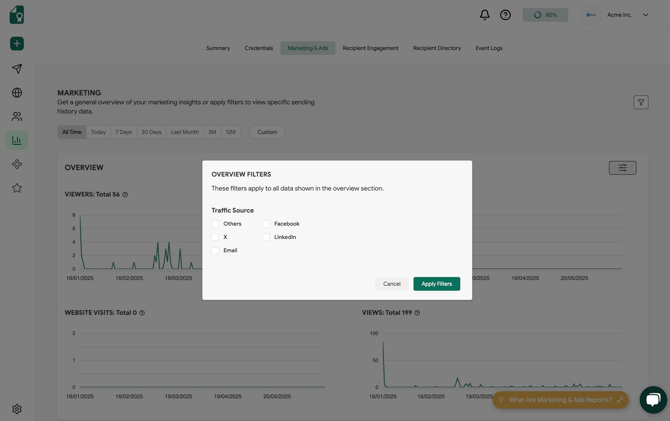
You can personalize this report by utilizing attribute filters to tailor the data to your specific needs.
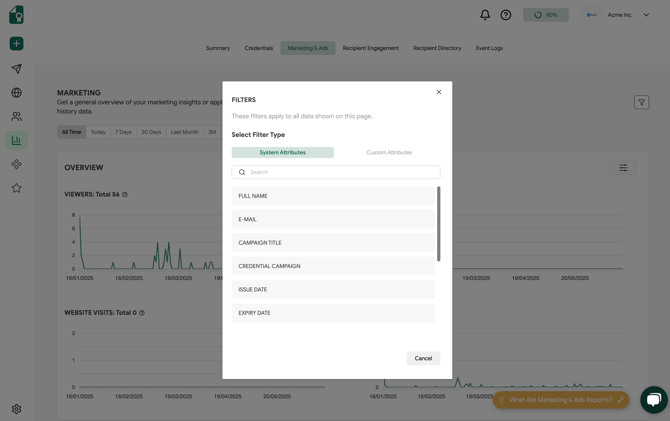
The **Overview Filters** enable you to customize the Overview report by selecting **specific traffic sources for analysis.**
Related Article: [What are Marketing & Ads Reports?](https://help.sertifier.com/what-are-marketing-ads-reports?hsLang=en)
### **Recipient Engagement Reports**
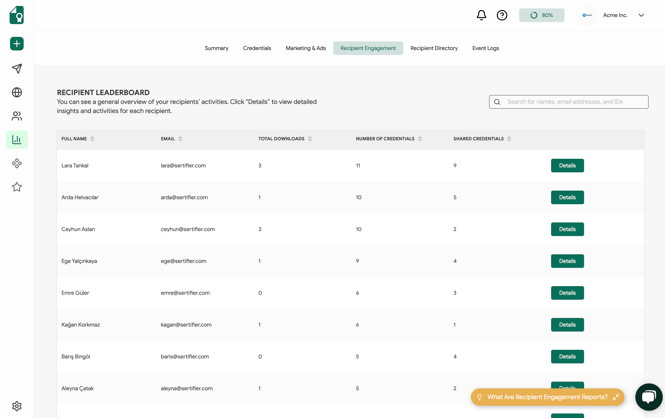
Recipient Engagement Reports shows you a general overview of your recipients’ activities.
You can see each of your recipient's **personal information** and their **top skills** based on their learning path, as well as the total number of **credentials** they earned, the total number of **downloaded credentials,** and the total number of **shared credentials** on social platforms.
Related Article: [What Are Recipient Engagement Reports?](https://help.sertifier.com/what-are-recipient-engagement-reports?hsLang=en)
### **Recipient Directory**
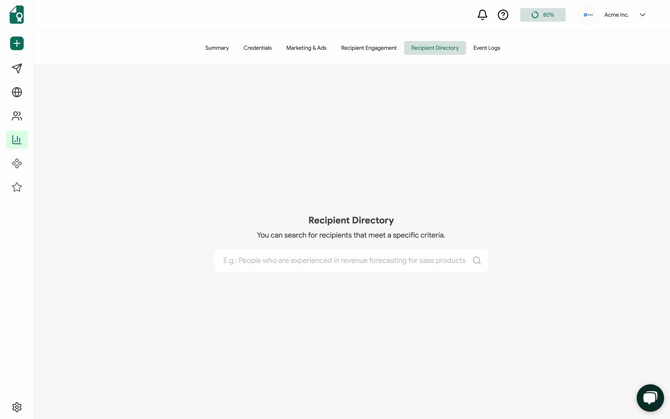
The **Recipient Directory** in Analytics enables you to compile a list of recipients categorized by their qualifications, based on the credentials they have obtained from your organization.
To generate a report, you can enter a specific query, such as: *"List recipients who have expertise in branding and digital marketing."*
### **Event Logs**
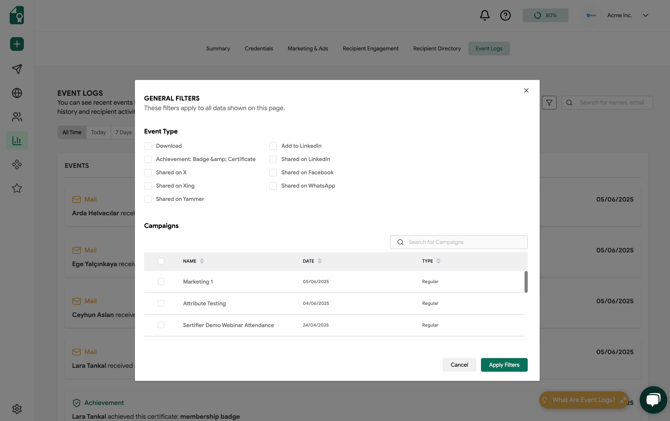
Event Logs shows you all of your recipients' recent activities. Event logs let you see every recent activity of your recipients; if they received their certification, downloaded, or shared them.
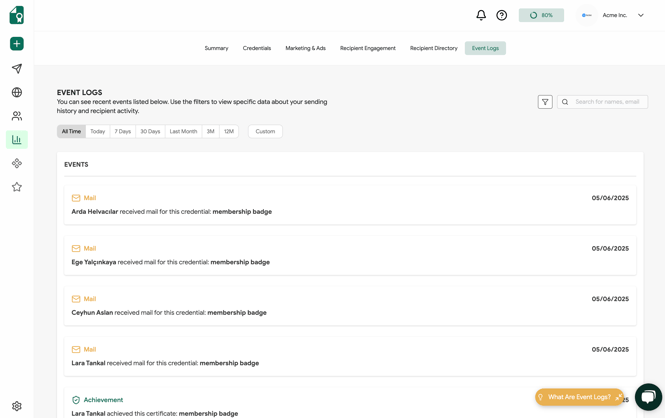
You can apply **General Filters** to narrow down the logs based on specific **Event Types** or **Credential Campaigns.**
Related Article: [What are Event Logs?](https://help.sertifier.com/what-are-event-logs?hsLang=en)
- [Get Started](https://help.sertifier.com/get-started?hsLang=en#main-content)
- [Your Subscription](https://help.sertifier.com/get-started?hsLang=en#your-subscription)
- [Create & Send Credentials](https://help.sertifier.com/get-started?hsLang=en#create-send-credentials)
- [Track Your Credentials](https://help.sertifier.com/get-started?hsLang=en#track-your-credentials)
- [Connect](https://help.sertifier.com/get-started?hsLang=en#connect)
- [Account Management](https://help.sertifier.com/account-management?hsLang=en#main-content)
- [Organization Settings](https://help.sertifier.com/account-management?hsLang=en#organization-settings)
- [Subscriptions](https://help.sertifier.com/account-management?hsLang=en#subscriptions)
- [Credential Website](https://help.sertifier.com/account-management?hsLang=en#credential-website)
- [Plans & Payment](https://help.sertifier.com/account-management?hsLang=en#plans-payment)
- [Analytics](https://help.sertifier.com/account-management?hsLang=en#analytics)
- [Privacy](https://help.sertifier.com/account-management?hsLang=en#privacy)
- [Utilizing Your Credentials](https://help.sertifier.com/utilizing-your-credentials?hsLang=en#main-content)
- [Verifying and Managing Your Credentials](https://help.sertifier.com/utilizing-your-credentials?hsLang=en#verifying-and-managing-your-credentials)
- [Sharing and Displaying Your Credentials](https://help.sertifier.com/utilizing-your-credentials?hsLang=en#sharing-and-displaying-your-credentials)
- [Using and Customizing Verified Wallet](https://help.sertifier.com/utilizing-your-credentials?hsLang=en#using-and-customizing-verified-wallet)
- [General Recipient FAQs](https://help.sertifier.com/utilizing-your-credentials?hsLang=en#general-recipient-faqs)
- [Generate Digital Credentials](https://help.sertifier.com/generate-digital-credentials?hsLang=en#main-content)
- [Create, Edit and Send Credentials](https://help.sertifier.com/generate-digital-credentials?hsLang=en#create-edit-and-send-credentials)
- [Credential Design](https://help.sertifier.com/generate-digital-credentials?hsLang=en#credential-design)
- [Credential Details](https://help.sertifier.com/generate-digital-credentials?hsLang=en#credential-details)
- [Email Templates](https://help.sertifier.com/generate-digital-credentials?hsLang=en#email-templates)
- [Recipients](https://help.sertifier.com/generate-digital-credentials?hsLang=en#recipients)
- [Attributes](https://help.sertifier.com/generate-digital-credentials?hsLang=en#attributes)
- [Collections](https://help.sertifier.com/generate-digital-credentials?hsLang=en#collections)
- [Pathways](https://help.sertifier.com/generate-digital-credentials?hsLang=en#pathways)
- [Integrations](https://help.sertifier.com/integrations?hsLang=en#main-content)
- [REST API](https://help.sertifier.com/integrations?hsLang=en#rest-api)
- [SSO](https://help.sertifier.com/integrations?hsLang=en#sso)
- [Zapier](https://help.sertifier.com/integrations?hsLang=en#zapier)
- [Zoom](https://help.sertifier.com/integrations?hsLang=en#zoom)
- [Canvas](https://help.sertifier.com/integrations?hsLang=en#canvas)
- [Moodle](https://help.sertifier.com/integrations?hsLang=en#moodle)
- [Mini Course Generator](https://help.sertifier.com/integrations?hsLang=en#mini-course-generator)
- [Thinkific](https://help.sertifier.com/integrations?hsLang=en#thinkific)
- [Tutor LMS](https://help.sertifier.com/integrations?hsLang=en#tutor-lms)
- [LearnDash](https://help.sertifier.com/integrations?hsLang=en#learndash)
- [Adobe Learning Manager](https://help.sertifier.com/integrations?hsLang=en#adobe-learning-manager)
- [Degreed](https://help.sertifier.com/integrations?hsLang=en#degreed)
- [RingCentral](https://help.sertifier.com/integrations?hsLang=en#ringcentral)
- [Absorb LMS](https://help.sertifier.com/integrations?hsLang=en#absorb-lms)
- [Pabbly Connect](https://help.sertifier.com/integrations?hsLang=en#pabbly-connect)
- [GoHighLevel](https://help.sertifier.com/integrations?hsLang=en#gohighlevel)
- [Enocta](https://help.sertifier.com/integrations?hsLang=en#enocta)
- [N8N](https://help.sertifier.com/integrations?hsLang=en#n8n)
- [Make](https://help.sertifier.com/integrations?hsLang=en#make)
- [TypeForm](https://help.sertifier.com/integrations?hsLang=en#typeform)
- [Salesforce](https://help.sertifier.com/integrations?hsLang=en#salesforce)
- [Europass](https://help.sertifier.com/integrations?hsLang=en#europass)
- [FAQ](https://help.sertifier.com/faq?hsLang=en#main-content)
- [Issuing Digital Credentials](https://help.sertifier.com/faq?hsLang=en#issuing-digital-credentials)
[](https://sertifier.com/?hsLang=en)
Copyright © 2025, Sertifier