---
title: What are Marketing & Ads Reports?
description: Marketing & Ads Reports allow you to see the general overview of your marketing insights.
---
[Skip to content](https://help.sertifier.com/what-are-marketing-ads-reports#main-content)
[Create Support Ticket](https://help.sertifier.com/kb-tickets/new?hsLang=en)
[](https://help.sertifier.com/?hsLang=en)
- [Create Support Ticket](https://help.sertifier.com/migration/kb-tickets/new)
- [FAQ](https://help.sertifier.com/faq)
Open main navigation
Close main navigation
- [Create Support Ticket](https://help.sertifier.com/migration/kb-tickets/new)
- [FAQ](https://help.sertifier.com/faq)
- [Create Support Ticket](https://help.sertifier.com/kb-tickets/new)
- [Login](https://app.sertifier.com/en/login)
[Login](https://app.sertifier.com/en/login)
How can we help you?
- There are no suggestions because the search field is empty.
1. [Help Center](https://help.sertifier.com/?hsLang=en)
2. [Account Management](https://help.sertifier.com/account-management?hsLang=en)
3. [Analytics](https://help.sertifier.com/account-management?hsLang=en#analytics)
# What are Marketing & Ads Reports?
## Marketing & Ads Reports allow you to see the general overview of your marketing insights.
*Marketing & Ads Reports* allows you to see the general overview of your marketing insights. *Ads* section gives you data on how many times are your credentials shared, what is the total cost that you would pay for such an outreach with paid ads. In this section, you can analyze how your ads perform.
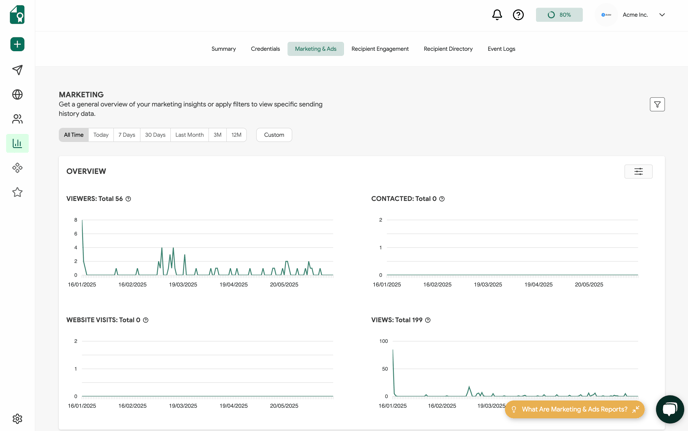
The credentials sent via Sertifier are easily shareable online. These credentials carry your brand image on them, so them being shared by people will cause a good organic marketing and recognition of your brand. *Ads* will help you figure out an organic marketing effect and how valuable is that.
You can personalize this report by utilizing attribute filters to tailor the data to your specific needs.

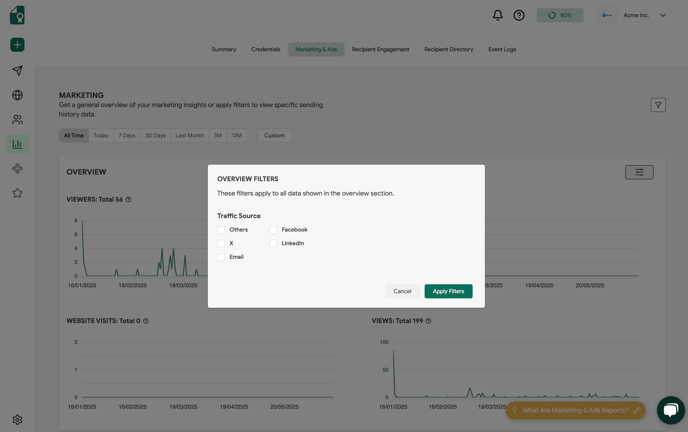
The **Overview Filters** enable you to customize the Overview report by selecting **specific traffic sources for analysis.**
Digital credentials serve as a powerful tool to showcase your brand. A robust credentialing program can effectively connect you with potential leads.
Every credential issued through Sertifier can easily be shared across various social platforms such as LinkedIn, Facebook, Twitter, Xing, Yammer, and WhatsApp. Recipients often choose to share their credentials with their network on these social accounts.
Each credential shared on these social platforms serves as a strong advocate for your brand. Additionally, the contact details, including your website, contact email, and social accounts that you include on your profile, can be easily accessed through credential pages, enabling visitors to easily connect with you.
Did you know that you can track the statistics of the above-mentioned metrics? You can see how many people have viewed your credentials, contacted you through them, and visited your website or social accounts on your *Marketing & Ads* reports.
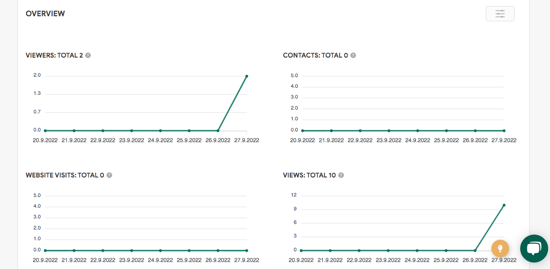
The *Overview* section lets you see the statistics for;
- **# of Viewers**
This graph shows how many unique visitors have viewed your credential pages.
- **# of "Contact Issuer" Button Clicks**
This graph shows how many times you’ve been contacted through the “*Contact Issuer*” button located on your credential pages.
- **# of Website Visits**
This graph shows how much website traffic you acquire through your credential pages.
- **# of Views**
This graph shows how many times your credential pages have been viewed.
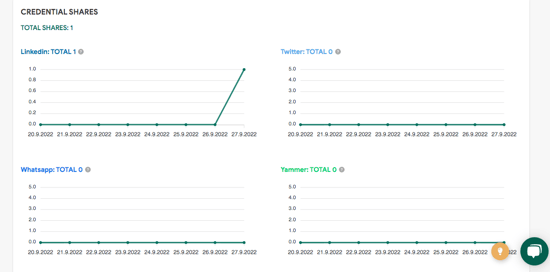
The graphs for *Credential Shares* display the frequency with which your credentials are shared as posts on various social platforms including LinkedIn, Twitter, WhatsApp, Facebook, Yammer, and Xing.
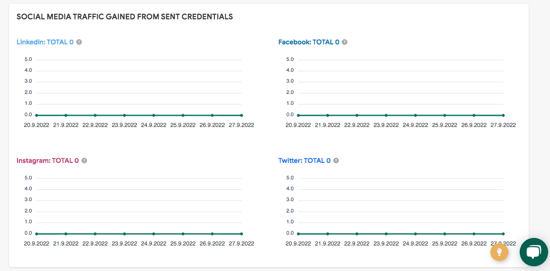
*Social Media Traffic* graphs illustrate the amount of traffic directed to your social accounts through your credential pages.
**Ads**
The Ads feature on Sertifier enables you to add banners to your credential pages, providing you with the opportunity to promote your desired content directly to visitors. The *Ads Report* allows you to assess the effectiveness of your banner ads.
Within this section, you have the ability to assess the performance of your ads. The graphs below provide insights into the total number of ad clicks, views, and viewers.
- **Views**
This graph shows how many times your banner ads have been viewed.
- **Clicks**
This graph shows how many times your banner ads have been clicked.
- **Viewers**
This graph shows how many unique visitors have viewed your banner ads.
- [Get Started](https://help.sertifier.com/get-started?hsLang=en#main-content)
- [Your Subscription](https://help.sertifier.com/get-started?hsLang=en#your-subscription)
- [Create & Send Credentials](https://help.sertifier.com/get-started?hsLang=en#create-send-credentials)
- [Track Your Credentials](https://help.sertifier.com/get-started?hsLang=en#track-your-credentials)
- [Connect](https://help.sertifier.com/get-started?hsLang=en#connect)
- [Account Management](https://help.sertifier.com/account-management?hsLang=en#main-content)
- [Organization Settings](https://help.sertifier.com/account-management?hsLang=en#organization-settings)
- [Subscriptions](https://help.sertifier.com/account-management?hsLang=en#subscriptions)
- [Credential Website](https://help.sertifier.com/account-management?hsLang=en#credential-website)
- [Plans & Payment](https://help.sertifier.com/account-management?hsLang=en#plans-payment)
- [Analytics](https://help.sertifier.com/account-management?hsLang=en#analytics)
- [Privacy](https://help.sertifier.com/account-management?hsLang=en#privacy)
- [Utilizing Your Credentials](https://help.sertifier.com/utilizing-your-credentials?hsLang=en#main-content)
- [Verifying and Managing Your Credentials](https://help.sertifier.com/utilizing-your-credentials?hsLang=en#verifying-and-managing-your-credentials)
- [Sharing and Displaying Your Credentials](https://help.sertifier.com/utilizing-your-credentials?hsLang=en#sharing-and-displaying-your-credentials)
- [Using and Customizing Verified Wallet](https://help.sertifier.com/utilizing-your-credentials?hsLang=en#using-and-customizing-verified-wallet)
- [General Recipient FAQs](https://help.sertifier.com/utilizing-your-credentials?hsLang=en#general-recipient-faqs)
- [Generate Digital Credentials](https://help.sertifier.com/generate-digital-credentials?hsLang=en#main-content)
- [Create, Edit and Send Credentials](https://help.sertifier.com/generate-digital-credentials?hsLang=en#create-edit-and-send-credentials)
- [Credential Design](https://help.sertifier.com/generate-digital-credentials?hsLang=en#credential-design)
- [Credential Details](https://help.sertifier.com/generate-digital-credentials?hsLang=en#credential-details)
- [Email Templates](https://help.sertifier.com/generate-digital-credentials?hsLang=en#email-templates)
- [Recipients](https://help.sertifier.com/generate-digital-credentials?hsLang=en#recipients)
- [Attributes](https://help.sertifier.com/generate-digital-credentials?hsLang=en#attributes)
- [Collections](https://help.sertifier.com/generate-digital-credentials?hsLang=en#collections)
- [Pathways](https://help.sertifier.com/generate-digital-credentials?hsLang=en#pathways)
- [Integrations](https://help.sertifier.com/integrations?hsLang=en#main-content)
- [REST API](https://help.sertifier.com/integrations?hsLang=en#rest-api)
- [SSO](https://help.sertifier.com/integrations?hsLang=en#sso)
- [Zapier](https://help.sertifier.com/integrations?hsLang=en#zapier)
- [Zoom](https://help.sertifier.com/integrations?hsLang=en#zoom)
- [Canvas](https://help.sertifier.com/integrations?hsLang=en#canvas)
- [Moodle](https://help.sertifier.com/integrations?hsLang=en#moodle)
- [Mini Course Generator](https://help.sertifier.com/integrations?hsLang=en#mini-course-generator)
- [Thinkific](https://help.sertifier.com/integrations?hsLang=en#thinkific)
- [Tutor LMS](https://help.sertifier.com/integrations?hsLang=en#tutor-lms)
- [LearnDash](https://help.sertifier.com/integrations?hsLang=en#learndash)
- [Adobe Learning Manager](https://help.sertifier.com/integrations?hsLang=en#adobe-learning-manager)
- [Degreed](https://help.sertifier.com/integrations?hsLang=en#degreed)
- [RingCentral](https://help.sertifier.com/integrations?hsLang=en#ringcentral)
- [Absorb LMS](https://help.sertifier.com/integrations?hsLang=en#absorb-lms)
- [Pabbly Connect](https://help.sertifier.com/integrations?hsLang=en#pabbly-connect)
- [GoHighLevel](https://help.sertifier.com/integrations?hsLang=en#gohighlevel)
- [Enocta](https://help.sertifier.com/integrations?hsLang=en#enocta)
- [N8N](https://help.sertifier.com/integrations?hsLang=en#n8n)
- [Make](https://help.sertifier.com/integrations?hsLang=en#make)
- [TypeForm](https://help.sertifier.com/integrations?hsLang=en#typeform)
- [Salesforce](https://help.sertifier.com/integrations?hsLang=en#salesforce)
- [Europass](https://help.sertifier.com/integrations?hsLang=en#europass)
- [FAQ](https://help.sertifier.com/faq?hsLang=en#main-content)
- [Issuing Digital Credentials](https://help.sertifier.com/faq?hsLang=en#issuing-digital-credentials)
[](https://sertifier.com/?hsLang=en)
Copyright © 2025, Sertifier