---
title: What is a Recipient Limit?
description: Recipient limit represents the number of distinct users you can send your certificates to.
---
[Skip to content](https://help.sertifier.com/what-is-a-recipient-limit#main-content)
[Create Support Ticket](https://help.sertifier.com/kb-tickets/new?hsLang=en)
[](https://help.sertifier.com/?hsLang=en)
- [Create Support Ticket](https://help.sertifier.com/migration/kb-tickets/new)
- [FAQ](https://help.sertifier.com/faq)
Open main navigation
Close main navigation
- [Create Support Ticket](https://help.sertifier.com/migration/kb-tickets/new)
- [FAQ](https://help.sertifier.com/faq)
- [Create Support Ticket](https://help.sertifier.com/kb-tickets/new)
- [Login](https://app.sertifier.com/en/login)
[Login](https://app.sertifier.com/en/login)
How can we help you?
- There are no suggestions because the search field is empty.
1. [Help Center](https://help.sertifier.com/?hsLang=en)
2. [Account Management](https://help.sertifier.com/account-management?hsLang=en)
3. [Plans & Payment](https://help.sertifier.com/account-management?hsLang=en#plans-payment)
# What is a Recipient Limit?
## The recipient limit represents the number of distinct users you can send your certificates to.
The recipient limit represents the number of unique users you can send your digital certificates & badges to.
During the Free Trial, you can send digital certificates & badges to up to 5 recipients to test out the service. You have the flexibility to tailor your plan to accommodate your specific needs, with options beginning at a recipient limit of 50 users.
Please note that any unused recipient limit cannot be carried over to the next subscription period. Each subscription period lasts for 1 year, providing ample time to leverage your recipient limits and utilize our services to their fullest potential.
Additionally, recipients who have already received a credential during a previous period will not be counted again towards the recipient limit or deducted from it once more. This ensures that you can efficiently manage and allocate your recipient resources based on your organization's needs.
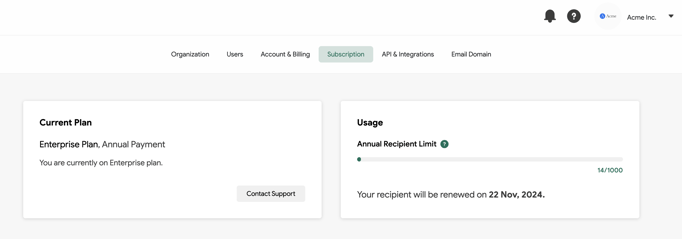
You can see your recipient limit from the **Settings** \> **Subscription**.
- [Get Started](https://help.sertifier.com/get-started?hsLang=en#main-content)
- [Your Subscription](https://help.sertifier.com/get-started?hsLang=en#your-subscription)
- [Create & Send Credentials](https://help.sertifier.com/get-started?hsLang=en#create-send-credentials)
- [Track Your Credentials](https://help.sertifier.com/get-started?hsLang=en#track-your-credentials)
- [Connect](https://help.sertifier.com/get-started?hsLang=en#connect)
- [Account Management](https://help.sertifier.com/account-management?hsLang=en#main-content)
- [Organization Settings](https://help.sertifier.com/account-management?hsLang=en#organization-settings)
- [Subscriptions](https://help.sertifier.com/account-management?hsLang=en#subscriptions)
- [Credential Website](https://help.sertifier.com/account-management?hsLang=en#credential-website)
- [Plans & Payment](https://help.sertifier.com/account-management?hsLang=en#plans-payment)
- [Analytics](https://help.sertifier.com/account-management?hsLang=en#analytics)
- [Privacy](https://help.sertifier.com/account-management?hsLang=en#privacy)
- [Utilizing Your Credentials](https://help.sertifier.com/utilizing-your-credentials?hsLang=en#main-content)
- [Verifying and Managing Your Credentials](https://help.sertifier.com/utilizing-your-credentials?hsLang=en#verifying-and-managing-your-credentials)
- [Sharing and Displaying Your Credentials](https://help.sertifier.com/utilizing-your-credentials?hsLang=en#sharing-and-displaying-your-credentials)
- [Using and Customizing Verified Wallet](https://help.sertifier.com/utilizing-your-credentials?hsLang=en#using-and-customizing-verified-wallet)
- [General Recipient FAQs](https://help.sertifier.com/utilizing-your-credentials?hsLang=en#general-recipient-faqs)
- [Generate Digital Credentials](https://help.sertifier.com/generate-digital-credentials?hsLang=en#main-content)
- [Create, Edit and Send Credentials](https://help.sertifier.com/generate-digital-credentials?hsLang=en#create-edit-and-send-credentials)
- [Credential Design](https://help.sertifier.com/generate-digital-credentials?hsLang=en#credential-design)
- [Credential Details](https://help.sertifier.com/generate-digital-credentials?hsLang=en#credential-details)
- [Email Templates](https://help.sertifier.com/generate-digital-credentials?hsLang=en#email-templates)
- [Recipients](https://help.sertifier.com/generate-digital-credentials?hsLang=en#recipients)
- [Attributes](https://help.sertifier.com/generate-digital-credentials?hsLang=en#attributes)
- [Collections](https://help.sertifier.com/generate-digital-credentials?hsLang=en#collections)
- [Pathways](https://help.sertifier.com/generate-digital-credentials?hsLang=en#pathways)
- [Integrations](https://help.sertifier.com/integrations?hsLang=en#main-content)
- [REST API](https://help.sertifier.com/integrations?hsLang=en#rest-api)
- [SSO](https://help.sertifier.com/integrations?hsLang=en#sso)
- [Zapier](https://help.sertifier.com/integrations?hsLang=en#zapier)
- [Zoom](https://help.sertifier.com/integrations?hsLang=en#zoom)
- [Canvas](https://help.sertifier.com/integrations?hsLang=en#canvas)
- [Moodle](https://help.sertifier.com/integrations?hsLang=en#moodle)
- [Mini Course Generator](https://help.sertifier.com/integrations?hsLang=en#mini-course-generator)
- [Thinkific](https://help.sertifier.com/integrations?hsLang=en#thinkific)
- [Tutor LMS](https://help.sertifier.com/integrations?hsLang=en#tutor-lms)
- [LearnDash](https://help.sertifier.com/integrations?hsLang=en#learndash)
- [Adobe Learning Manager](https://help.sertifier.com/integrations?hsLang=en#adobe-learning-manager)
- [Degreed](https://help.sertifier.com/integrations?hsLang=en#degreed)
- [RingCentral](https://help.sertifier.com/integrations?hsLang=en#ringcentral)
- [Absorb LMS](https://help.sertifier.com/integrations?hsLang=en#absorb-lms)
- [Pabbly Connect](https://help.sertifier.com/integrations?hsLang=en#pabbly-connect)
- [GoHighLevel](https://help.sertifier.com/integrations?hsLang=en#gohighlevel)
- [Enocta](https://help.sertifier.com/integrations?hsLang=en#enocta)
- [N8N](https://help.sertifier.com/integrations?hsLang=en#n8n)
- [Make](https://help.sertifier.com/integrations?hsLang=en#make)
- [TypeForm](https://help.sertifier.com/integrations?hsLang=en#typeform)
- [Salesforce](https://help.sertifier.com/integrations?hsLang=en#salesforce)
- [Europass](https://help.sertifier.com/integrations?hsLang=en#europass)
- [FAQ](https://help.sertifier.com/faq?hsLang=en#main-content)
- [Issuing Digital Credentials](https://help.sertifier.com/faq?hsLang=en#issuing-digital-credentials)
[](https://sertifier.com/?hsLang=en)
Copyright © 2025, Sertifier