---
title: Name Change Requests
description: Name Change Request feature provides your recipients with the flexibility they need to personalize their credentials, ensuring accurate and professional documentation.
---
[Skip to content](https://help.sertifier.com/name-change-request#main-content)
[Create Support Ticket](https://help.sertifier.com/kb-tickets/new?hsLang=en)
[](https://help.sertifier.com/?hsLang=en)
- [Create Support Ticket](https://help.sertifier.com/migration/kb-tickets/new)
- [FAQ](https://help.sertifier.com/faq)
Open main navigation
Close main navigation
- [Create Support Ticket](https://help.sertifier.com/migration/kb-tickets/new)
- [FAQ](https://help.sertifier.com/faq)
- [Create Support Ticket](https://help.sertifier.com/kb-tickets/new)
- [Login](https://app.sertifier.com/en/login)
[Login](https://app.sertifier.com/en/login)
How can we help you?
- There are no suggestions because the search field is empty.
1. [Help Center](https://help.sertifier.com/?hsLang=en)
2. [Generate Digital Credentials](https://help.sertifier.com/generate-digital-credentials?hsLang=en)
3. [Recipients](https://help.sertifier.com/generate-digital-credentials?hsLang=en#recipients)
# Name Change Requests
## Name Change Request feature provides your recipients with the flexibility they need to personalize their credentials, ensuring accurate and professional documentation.
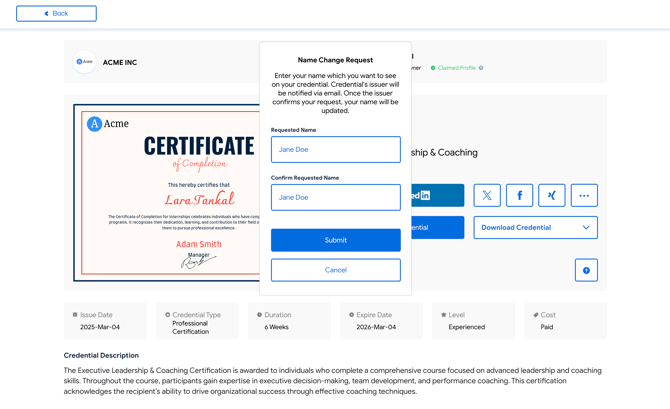
If you happen to make a typo while entering your recipient's name, rectifying any name-related errors is now made easy with the new Name Change Request feature.
Your recipients can send you a Name Change Request from the verification page.
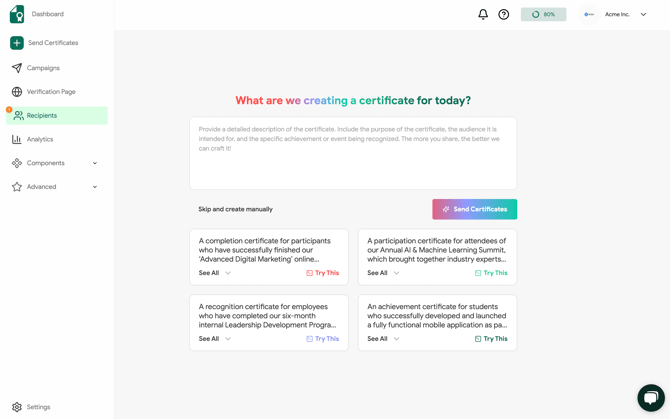
You will receive a notification on the **Recipients** page in the left menu whenever a name change request is pending your review.
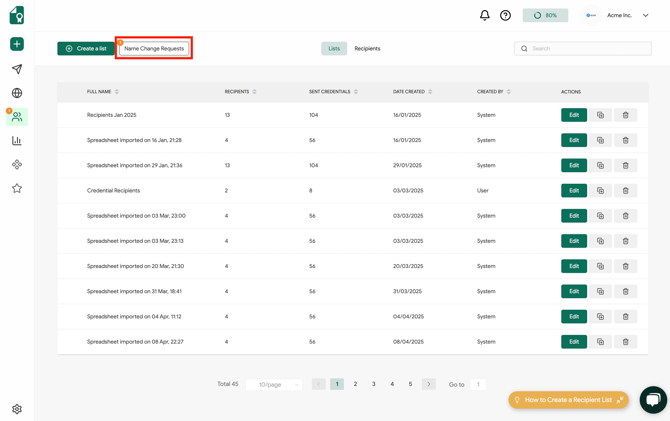
Upon accessing the **Recipients** page, simply click on the **Name Change Requests** section to view the details of each request and take the necessary actions.
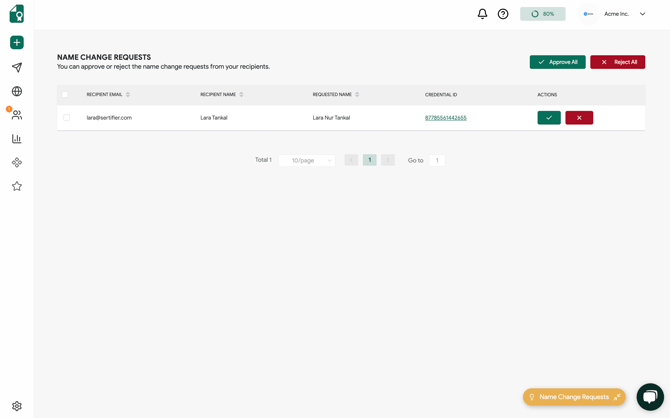
On the **Name Change Requests** page, you'll find a comprehensive list of all pending requests along with their associated credential details. You have the option to approve or reject each request individually, or you can manage multiple requests at once for greater efficiency.
Related Article: [How Do I Edit a Recipient's Information?](https://help.sertifier.com/how-do-i-edit-a-recipients-information?hsLang=en)
- [Get Started](https://help.sertifier.com/get-started?hsLang=en#main-content)
- [Your Subscription](https://help.sertifier.com/get-started?hsLang=en#your-subscription)
- [Create & Send Credentials](https://help.sertifier.com/get-started?hsLang=en#create-send-credentials)
- [Track Your Credentials](https://help.sertifier.com/get-started?hsLang=en#track-your-credentials)
- [Connect](https://help.sertifier.com/get-started?hsLang=en#connect)
- [Account Management](https://help.sertifier.com/account-management?hsLang=en#main-content)
- [Organization Settings](https://help.sertifier.com/account-management?hsLang=en#organization-settings)
- [Subscriptions](https://help.sertifier.com/account-management?hsLang=en#subscriptions)
- [Credential Website](https://help.sertifier.com/account-management?hsLang=en#credential-website)
- [Plans & Payment](https://help.sertifier.com/account-management?hsLang=en#plans-payment)
- [Analytics](https://help.sertifier.com/account-management?hsLang=en#analytics)
- [Privacy](https://help.sertifier.com/account-management?hsLang=en#privacy)
- [Utilizing Your Credentials](https://help.sertifier.com/utilizing-your-credentials?hsLang=en#main-content)
- [Verifying and Managing Your Credentials](https://help.sertifier.com/utilizing-your-credentials?hsLang=en#verifying-and-managing-your-credentials)
- [Sharing and Displaying Your Credentials](https://help.sertifier.com/utilizing-your-credentials?hsLang=en#sharing-and-displaying-your-credentials)
- [Using and Customizing Verified Wallet](https://help.sertifier.com/utilizing-your-credentials?hsLang=en#using-and-customizing-verified-wallet)
- [General Recipient FAQs](https://help.sertifier.com/utilizing-your-credentials?hsLang=en#general-recipient-faqs)
- [Generate Digital Credentials](https://help.sertifier.com/generate-digital-credentials?hsLang=en#main-content)
- [Create, Edit and Send Credentials](https://help.sertifier.com/generate-digital-credentials?hsLang=en#create-edit-and-send-credentials)
- [Credential Design](https://help.sertifier.com/generate-digital-credentials?hsLang=en#credential-design)
- [Credential Details](https://help.sertifier.com/generate-digital-credentials?hsLang=en#credential-details)
- [Email Templates](https://help.sertifier.com/generate-digital-credentials?hsLang=en#email-templates)
- [Recipients](https://help.sertifier.com/generate-digital-credentials?hsLang=en#recipients)
- [Attributes](https://help.sertifier.com/generate-digital-credentials?hsLang=en#attributes)
- [Collections](https://help.sertifier.com/generate-digital-credentials?hsLang=en#collections)
- [Pathways](https://help.sertifier.com/generate-digital-credentials?hsLang=en#pathways)
- [Integrations](https://help.sertifier.com/integrations?hsLang=en#main-content)
- [REST API](https://help.sertifier.com/integrations?hsLang=en#rest-api)
- [SSO](https://help.sertifier.com/integrations?hsLang=en#sso)
- [Zapier](https://help.sertifier.com/integrations?hsLang=en#zapier)
- [Zoom](https://help.sertifier.com/integrations?hsLang=en#zoom)
- [Canvas](https://help.sertifier.com/integrations?hsLang=en#canvas)
- [Moodle](https://help.sertifier.com/integrations?hsLang=en#moodle)
- [Mini Course Generator](https://help.sertifier.com/integrations?hsLang=en#mini-course-generator)
- [Thinkific](https://help.sertifier.com/integrations?hsLang=en#thinkific)
- [Tutor LMS](https://help.sertifier.com/integrations?hsLang=en#tutor-lms)
- [LearnDash](https://help.sertifier.com/integrations?hsLang=en#learndash)
- [Adobe Learning Manager](https://help.sertifier.com/integrations?hsLang=en#adobe-learning-manager)
- [Degreed](https://help.sertifier.com/integrations?hsLang=en#degreed)
- [RingCentral](https://help.sertifier.com/integrations?hsLang=en#ringcentral)
- [Absorb LMS](https://help.sertifier.com/integrations?hsLang=en#absorb-lms)
- [Pabbly Connect](https://help.sertifier.com/integrations?hsLang=en#pabbly-connect)
- [GoHighLevel](https://help.sertifier.com/integrations?hsLang=en#gohighlevel)
- [Enocta](https://help.sertifier.com/integrations?hsLang=en#enocta)
- [N8N](https://help.sertifier.com/integrations?hsLang=en#n8n)
- [Make](https://help.sertifier.com/integrations?hsLang=en#make)
- [TypeForm](https://help.sertifier.com/integrations?hsLang=en#typeform)
- [Salesforce](https://help.sertifier.com/integrations?hsLang=en#salesforce)
- [Europass](https://help.sertifier.com/integrations?hsLang=en#europass)
- [FAQ](https://help.sertifier.com/faq?hsLang=en#main-content)
- [Issuing Digital Credentials](https://help.sertifier.com/faq?hsLang=en#issuing-digital-credentials)
[](https://sertifier.com/?hsLang=en)
Copyright © 2025, Sertifier