
The Email Digest feature allows you to set up personalized, automated email reports based on specific engagement metrics and recipient actions. It is designed to help you monitor your program’s success over time and keep track of your learners' activities without any manual effort.
These email digest settings are personal and apply only to your individual account; other users or admins within your organization will not be affected by your choices.
Navigation: Where to Find the Email Digest
To access your Email Digest configuration panel:
-
Log into your Sertifier dashboard.
-
Navigate to your account settings.
-
Select the Email Digest tab from the top navigation bar.
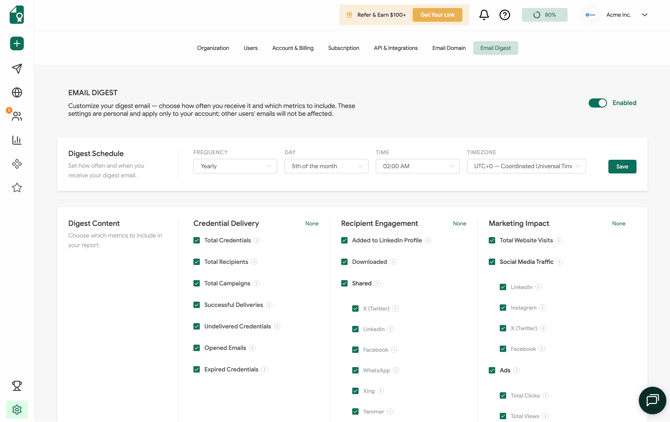
1. Enabling and Scheduling Your Digest
At the top right of the page, toggle the switch to Enabled to start receiving updates. Once turned on, you can customize exactly when your digest arrives under the Digest Schedule section:
-
Frequency: Choose how often you want to receive the summary report (e.g., Weekly, Monthly, Yearly).
-
Day: Choose the specific day of the week or date of the month you want the report generated.
-
Time & Timezone: Set the precise delivery time and match it to your preferred timezone so the data aligns perfectly with your working hours.
-
Click Save on the right side of the schedule block to lock in your timing preferences.
2. Customizing Your Report Content
You have granular control over exactly which data points are included in your email. You can select all, mix and match, or click None above any section to clear the checkboxes entirely.
The available metrics are divided into three main categories:
Credential Delivery
Track the operational performance and reach of your sent campaigns:
-
Total Credentials & Total Recipients: General volume metrics of your issuance.
-
Total Campaigns: Number of active or completed distribution batches.
-
Successful Deliveries vs. Undelivered Credentials: Monitor your bounce and successful arrival rates.
-
Opened Emails: See how many recipients are opening your delivery notifications.
-
Expired Credentials: Track how many certificates have crossed their validity period.
Recipient Engagement
See how your learners interact with their credentials once received:
-
Added to LinkedIn Profile: Monitor how many recipients showcase their achievement on their professional profile.
-
Downloaded: Track the volume of PDF downloads.
-
Shared: Break down organic shares across major social networks, including X (Twitter), LinkedIn, Facebook, WhatsApp, Xing, and Yammer.
Marketing Impact
Evaluate the visual footprint and traffic driven back to your brand through shared credentials:
-
Total Website Visits: See overall referral traffic hitting your verification pages.
-
Social Media Traffic: Detailed analytics breaking down social clicks to specific networks like LinkedIn, Instagram, X (Twitter), and Facebook.
-
Ads: If utilizing embedded ad features, track performance metrics like Total Clicks, Total Views, and Unique Viewers.
The Customizable Email Digest puts full control of your program's analytics directly into your inbox, allowing you to stay informed on delivery success, recipient shares, and marketing performance on your own schedule. By setting up your personal reporting preferences today, you can effortlessly track trends and maximize the ongoing impact of your digital credentialing initiative.